
Alarmy - Alarm Clock & Sleep
Sleep Tracker & Alarm Clock by DelightroomProductivity
4.781.85K Reviews
- Version
- 26.42.1
- Installs
- 50.00M
- Age Rating
- Everyone
Screenshots

Our Review of Alarmy - Alarm Clock & Sleep
 Analysis by Appyee
If you’re anything like me, getting out of bed in the morning can be a real struggle. Enter Alarmy - Alarm Clock & Sleep, an app that promises not just to wake you up, but to kickstart your day with a burst of energy. You might have heard it referred to as “the world’s most annoying alarm clock,” and let me tell you, it lives up to that reputation in the best way possible.
What to expect from a mission-based alarm
The main difference from a basic phone alarm is that Alarmy can ask you to do something before it stops ringing. That changes the job of the alarm: instead of tapping once while half asleep, you need to become alert enough to finish a small task. I find this useful when my usual snooze habit is less about needing more sleep and more about acting on autopilot.
That extra friction is also the key trade-off. A task that feels motivating in the evening can feel irritating when you are already late, so I’d start with a manageable mission rather than choosing the hardest option straight away. The aim is to get upright and conscious, not to turn every weekday into a test of endurance.
Alarmy is a free productivity app from Sleep Tracker & Alarm Clock by Delightroom. It has a 4.6 average from around two million ratings, and more than ten million installs. The age rating is Everyone, while optional in-app purchases range from about $2.90 to $159.99 per item. Those purchases mean the free starting point is not the whole story, so I’d explore the features you actually plan to use before paying for anything.
Features That Make You Get Up
Alarmy isn’t your average alarm clock. Instead of letting you hit snooze until you absolutely have to get up, it gives you tasks to complete in order to turn off the alarm. It’s like having a personal trainer who’s not going to let you slack off!
- Photo Missions: Ever tried to turn off an alarm by taking a picture of your bathroom sink? Now you can. Set a location in your house, and the alarm won’t stop until you take a photo of it. It’s a clever way to get you moving right out of bed.
- Math Problems: If you’re a numbers person, this feature will definitely wake up your brain. Solve math problems to silence your alarm. It’s a mental workout first thing in the morning!
- Shake Mode: Get physical by shaking your phone a set number of times. It’s like a mini morning workout, ensuring you’re wide awake by the time it stops.
Choose a mission that fits your morning
These options suit different routines rather than one universal kind of sleeper. A photo mission can work well if you already have a reason to walk to a particular spot, such as the bathroom or kitchen. The useful detail is to choose a target that is easy to recognize in the light and remains in the same place. A cluttered counter or an object that gets moved around can turn a quick wake-up task into needless fiddling.
Math is a better fit if you want to stay beside your bed but need your mind to switch on. I would begin with a difficulty I can complete while groggy; making the task too demanding risks frustration, not a better morning. Shaking is the most physical option, but it may be awkward if your phone is on a surface where it could slide or fall. Where you keep the device matters as much as which mission you choose.
Before relying on any alarm for an important morning, I’d test the chosen mission at a convenient time and make sure I understand how it behaves. That small rehearsal helps you avoid discovering a confusing setting while the alarm is already ringing. It is also a sensible way to check whether the task feels realistic in your actual bedroom rather than merely appealing in the setup screen.
First setup: make the first alarm easy to succeed with
Alarmy has a clean, user-friendly interface that makes setting alarms quick and easy. The app is intuitive, with all the main features accessible from the home screen. As someone who isn’t tech-savvy, I appreciated how straightforward it was to navigate.
For a first attempt, I’d set one alarm for a morning when being a few minutes late would not cause trouble. Pick a mission you can complete without searching for an item, crossing a dark room, or doing mental arithmetic that feels punishing. If you choose a photo task, take the reference picture from the exact place and angle you expect to use later. This makes the first real attempt more about getting up than troubleshooting what the app considers a match.
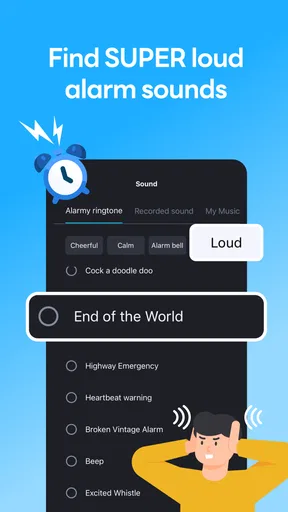
Customization is another strong suit. You can choose from a variety of alarm sounds, including some that are loud enough to wake the dead. If you’re like me and need the extra push, you can even set multiple alarms with different tasks for each. That’s right; there’s no escaping this app’s determination to get you up!
Multiple alarms can be useful for different parts of a week, but I would avoid creating a chain of alarms that all demand attention. Too many alerts can make the routine feel noisy and teach you to ignore them. A simpler setup—one dependable wake-up alarm, then a separate one only when your schedule genuinely needs it—is easier to evaluate and adjust.
Make the phone part of the plan
A mission-based alarm is only practical if the phone is ready for the job. I’d place it somewhere stable and reachable enough for the selected task, but not so close that I can silence it with a sleepy reflex. For a photo mission, that usually means thinking through the route to the target before bedtime. For a shake task, choose a safe surface and hold the device securely when you pick it up.
There is a real balance here: placing the phone across the room can encourage movement, but an inconvenient or unsafe location adds risk without improving the routine. Keep the path clear, particularly if you get up in low light. If you share a bedroom, consider whether a loud alarm and a movement-based task will disturb someone else; a standard vibration or a quieter alternative may be kinder in that situation.
Sleep tools are useful, but they are a separate habit
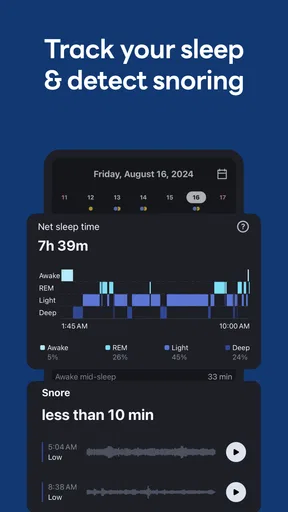
Aside from its alarm capabilities, Alarmy - Alarm Clock & Sleep offers sleep tracking features that help you get a better night’s rest. The app monitors your sleep patterns and provides insights into how you can improve your sleeping habits.
I’d treat those insights as prompts for noticing routines, not as a substitute for professional advice or a reason to obsess over every night. A more useful approach is to look for a repeated pattern and make one practical adjustment, such as keeping bedtime more consistent. If checking sleep information makes you anxious, it may be better to focus on the alarm and leave tracking aside.
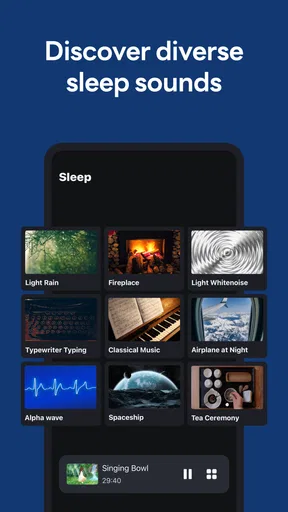
For those who struggle with winding down, Alarmy includes a selection of relaxing sounds and bedtime stories to help you drift off. There’s even a meditation section, which is perfect for easing stress before hitting the hay. It’s like having a sleep coach in your pocket!
Those bedtime options can make the app feel like more than an alarm, but they are not essential to getting value from its central feature. I’d try one wind-down tool at a time rather than turning bedtime into another complicated routine. If you already use a sleep or meditation app you like, there may be little reason to move those habits; Alarmy can still serve as your wake-up tool.
A realistic morning, from ringing to starting the day
Picture a workday when I need to leave on time but tend to silence my phone without fully waking. The night before, I set a single alarm and choose a photo target near the bathroom. In the morning, I have to stand, walk over, and take the picture. That movement does not guarantee I’ll feel energetic, but it breaks the familiar pattern of turning off the sound and drifting back to sleep.
The first meaningful success is not a perfect sleep score or a dramatic new routine. It is completing the task, staying out of bed, and moving into the next ordinary action—washing up, getting dressed, or making breakfast. I’d judge the setup by whether it helps me do that consistently. If I start dreading the mission, I would change it rather than assume I need to make it more difficult.
For a student with an early class, a math task may be more convenient than walking across a shared room. For someone who works changing shifts, the main benefit may be having a wake-up method that demands attention on the mornings that matter. On a day off, a loud task may be unnecessary; a gentler, conventional alarm can be the better choice if the app’s settings allow the routine you want.
How it compares with a regular clock app
A built-in phone alarm is usually the simpler choice: it is familiar, quick to set, and does not ask you to complete a mission. If you wake reliably and only need a reminder at a particular time, that simplicity is an advantage. Alarmy makes more sense when the problem is not remembering to set an alarm but repeatedly turning it off before you are truly awake.
Compared with a basic alarm, its distinctive value is the action required to silence it, alongside sleep-related tools in the same app. That combination can be useful if you want your wake-up routine and wind-down experiments in one place. The trade-off is that there are more settings to think about, and a mission can become a nuisance when you are ill, exhausted, sharing a room, or trying not to disturb others. In those cases, the ordinary clock already on your phone may be the more considerate option.
Alarmy was released on August 22, 2012, and its current version is 26.13.0, with a minimum operating-system requirement of version 9. I’d check that your device meets that requirement before planning to make it part of your routine. It is free to start, but paid in-app items are available, so I would not assume every option is included at no cost.
Common confusion and sensible limits
The most common mistake with a task-based alarm is setting a mission that sounds clever but is inconvenient at the exact moment it matters. A photo target should be easy to reach and identify; a shake task should not put the phone at risk; a math task should be challenging enough to engage you but not so hard that you are stuck. If a task fails to fit your home or schedule, changing the mission is more sensible than blaming yourself for struggling.
Another point worth remembering is that an alarm cannot replace enough sleep. If you are regularly exhausted, making the wake-up task harsher may only make mornings more unpleasant. I see this app as a tool for interrupting snooze habits, not as a fix for an unsustainable bedtime or a demanding schedule. The sleep features may help you reflect on patterns, but the most useful result still depends on what you do with that information.
It is also reasonable to ask whether the app will suit someone who shares a room or needs a quiet morning. A forceful sound and a mission that involves walking may not be suitable for every household. I’d choose a conventional alarm or a less disruptive approach if waking another person would create more trouble than the mission solves. Likewise, if you prefer a minimal interface and never snooze, adding another alarm app may not improve anything.
Why Alarmy Stands Out
What sets Alarmy apart is its ability to combine practical alarm features with tools for better sleep. It’s a holistic approach to managing your sleep cycle, ensuring you wake up refreshed and ready to tackle the day.
The app’s versatility means it can cater to different types of sleepers. Whether you’re someone who needs gentle prodding or a full-on wake-up call, Alarmy’s got you covered. Plus, its additional features like weather updates and morning news summaries make it a comprehensive morning companion.
That range is most helpful when you use only the parts that support a routine you already want, rather than trying to adopt every feature at once. I would start with one alarm mission, learn whether it changes my morning, and then explore sleep tools only if they answer a question I actually have. This keeps setup manageable and makes it easier to tell which part is helping.
Alarmy - Alarm Clock & Sleep is available for download on both Android and iOS, and it’s definitely worth checking out if you’re serious about improving your mornings.
In conclusion, if you’re tired of snooze buttons and want a reliable way to get up on time, Alarmy might just be the app you’ve been waiting for. It’s a game-changer for anyone struggling with mornings, and I personally found it to be an essential tool in my daily routine. Give it a try, and you might find yourself looking forward to the sound of your alarm!
Privacy and Permissions
See what permissions an app requests and how it handles your data.
- Location
- approximate location (network-based), precise location (GPS and network-based)
- Photos/Media/Files
- read the contents of your USB storage, modify or delete the contents of your USB storage
- Storage
- read the contents of your USB storage, modify or delete the contents of your USB storage
- Camera
- take pictures and videos
- Microphone
- record audio
- Wi-Fi connection information
- view Wi-Fi connections
- Other
- view network connections, change system display settings, disable your screen lock, control flashlight, full network access, close other apps, change your audio settings, run at startup, draw over other apps, control vibration, prevent device from sleeping, modify system settings, Google Play license check, read Google service configuration
Verdict
Strengths of Alarmy - Alarm Clock & Sleep
- Highly customizable alarm settings.
- Includes a variety of challenging tasks.
- Offers sleep tracking features.
- Intuitive and user-friendly interface.
- Integrates well with other apps.
Limitations of Alarmy - Alarm Clock & Sleep
- Free version includes ads.
- Some features require in-app purchases.
- Can be resource-intensive on older devices.
- Limited customization for sleep analysis.
- Occasional bugs in the task challenges.
Similar Picks in This Category
View All
Google Calendar
Google LLC4.6

Google Drive
Google LLC4.3

Google Assistant
Google LLC3.9

Microsoft OneDrive
Microsoft Corporation4.6

Samsung Calendar
Samsung Electronics Co., Ltd.4.1

Microsoft OneNote: Save Notes
Microsoft Corporation4.6
Frequently Asked Questions
How does Alarmy ensure I wake up on time?
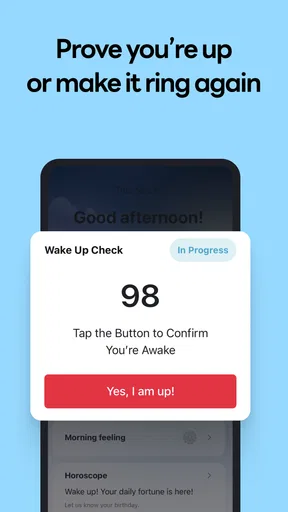
Alarmy is designed with several unique wake-up features to ensure you start your day on time. It offers tasks like taking a photo, solving math problems, or shaking your phone to turn off the alarm. These tasks require active engagement, making it difficult to fall back asleep.
Can I customize the alarm sounds and settings in Alarmy?
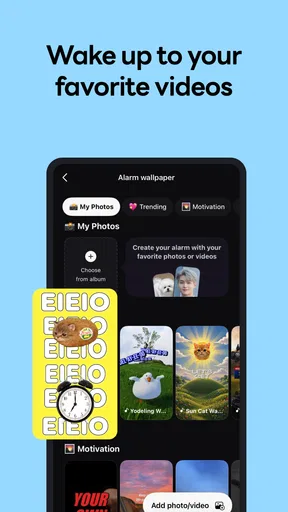
Yes, Alarmy offers extensive customization options. You can choose from a wide range of alarm sounds or even use your own music. Additionally, you can set different alarms for different days, adjust the volume, and choose specific tasks to complete before the alarm turns off.
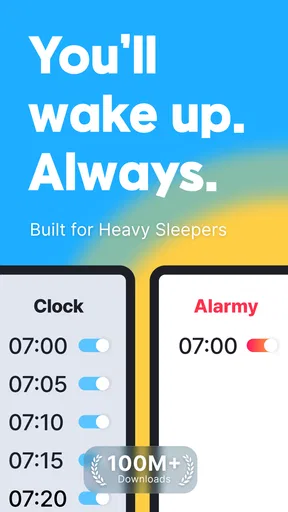
Is Alarmy suitable for heavy sleepers?
Absolutely. Alarmy is specifically designed for heavy sleepers with its challenging wake-up tasks. The app's customizable difficulty levels ensure that even those who struggle to wake up in the morning will find it effective. Users can select tasks that require full attention, making it hard to ignore the alarm.
Does Alarmy offer any sleep tracking features?
Yes, Alarmy not only wakes you up but also helps improve your sleep quality. It offers sleep tracking features that monitor your sleep patterns. With these insights, you can adjust your sleep habits, ensuring you wake up refreshed and ready for the day.
Are there any in-app purchases or subscriptions in Alarmy?
Alarmy is free to download with optional in-app purchases. These purchases include advanced features like additional alarm sounds, more wake-up tasks, and the removal of ads. Users can also opt for a subscription model to access premium features, ensuring a more personalized experience.
